Inventory raised the useful questions.
The first inventory raised more useful questions. Which apps do I actually use? How much space does each app really occupy? What files would an uninstall remove? Which apps need updates? Can cleanup be safer and reversible? How do we distinguish an unused app from one we simply have not monitored long enough?
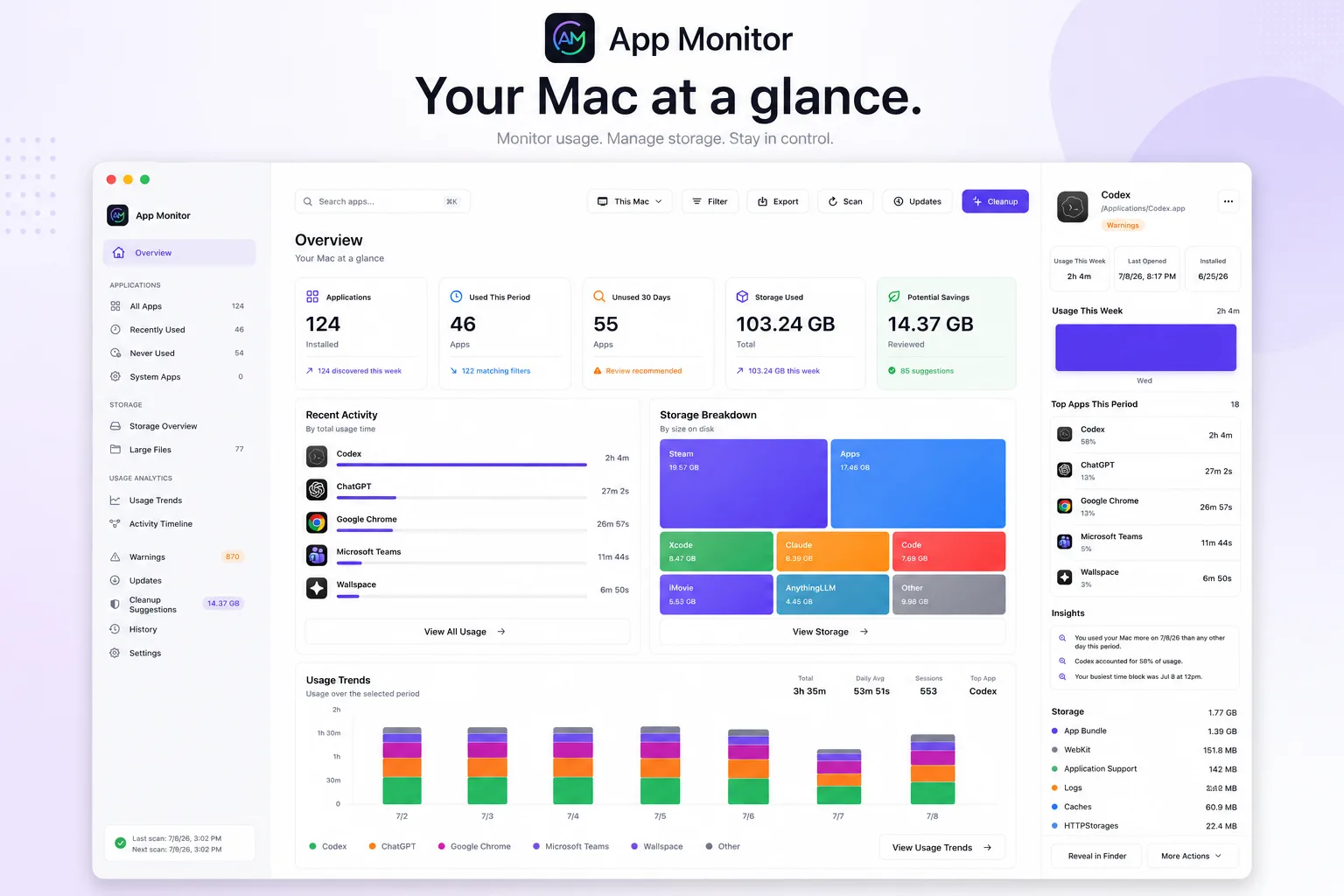
Those questions shaped the product. App Monitor is now an open-source native SwiftUI application backed by a lightweight local SQLite database. There are no accounts, no hosted backend, and no telemetry. Inventory, usage history, storage scans, cleanup actions, update results, and settings stay on the Mac.
The project has grown through five public beta releases and, as of this writing, more than 100 stars on GitHub.
Usage data needs an uncertainty state.
App Monitor discovers applications across the usual macOS locations and can optionally search more broadly for bundles elsewhere on the system. Once monitoring is enabled, it records foreground activity while accounting for idle time and paused sessions. That history powers daily trends, top-app comparisons, heatmaps, session timelines, and CSV exports.
We also added Spotlight history import. Spotlight cannot reconstruct exact historical durations, but it can provide useful signals such as last-used dates, usage counts, and the number of days on which an application was opened.
App identity extends beyond the bundle.
Mac apps accumulate caches, preferences, containers, logs, cookies, WebKit data, crash reports, and files in Application Support. App Monitor scans those related locations, groups them under the owning application, shows storage by app and category, highlights large files, and exposes the exact paths behind every total.
This required more identity reconciliation than expected. A Mac can contain several convincing copies of one app—in Downloads, backups, mounted volumes, or Xcode's DerivedData. Bundle identifiers help, but they are not sufficient by themselves. We needed deliberate rules for canonical identity, duplicate bundles, scan state, and whether zero means “nothing found” or “not scanned yet.”
Warnings need evidence and confidence.
The health system checks signals such as code signing, Gatekeeper assessment, stale bundles, crashes, and permission-sensitive locations. Its first version taught us that a long list of technically correct findings can still feel like noise.
We shifted toward normalized and deduplicated warnings, confidence levels, protected-system exclusions, and clearer evidence. The objective is not to frighten the user with every observable irregularity. It is to help them decide what deserves attention.
Each update provider behaves differently.
App Monitor brings Mac App Store, Homebrew, Apple software updates, Sparkle feeds, Electron metadata, GitHub releases, application-provided metadata, and guided manual update paths into one view.
By the 1.2.0 beta 3 release, the app could filter update sources, show formatted release notes, trigger built-in updaters, adopt compatible apps into Homebrew, reconcile completed App Store updates, and securely support Homebrew authorization through a signed Keychain-backed helper.
This was humbling work. Sparkle feeds may contain delta packages that are useless without the correct previous version. Homebrew adoption is different from a normal update. App Store tooling can mix useful output with warnings. Development directories can contain convincing duplicate bundles.
The durable answer was not a larger version-comparison function. It was provider-specific behavior combined with a normalized model that preserves where each conclusion came from.
Cleanup starts with a reviewable plan.
App Monitor uses a quarantine-first workflow. It shows exact candidate paths, explains why each was identified, lets the user queue only approved items, and records enough history to restore quarantined content. Uninstall follows the same model: present the plan and affected paths before moving anything to Trash.
We deliberately moved away from categorical claims such as “safe to delete.” The app emphasizes evidence, ownership, exclusions, confidence, and reversibility. If the evidence is uncertain, the interface should say so.
The main app and menu bar share one state model.
The main application now includes overview, usage, timeline, storage, warnings, cleanup, history, updates, and privacy controls. A menu-bar companion provides quick access to warning and update counts, recent activity, freshness information, and common actions.
Recent releases focused heavily on making those capabilities understandable. Beta 4 reorganized navigation, simplified toolbar commands, improved settings, and delayed the detail inspector until needed. Beta 5 addressed warning triage, dense tables, sparse charts, sidebar discoverability, cleanup evidence, menu-bar states, and contextual actions. The complete history is on GitHub Releases.
Accessibility became part of the design system rather than a final checklist: non-color status cues, improved contrast, stable focus behavior, semantic heatmap labels, an equivalent table representation, accessibility identifiers, and keyboard and VoiceOver QA.
Four rules for trustworthy maintenance tools.
- Show the evidence. Display exact paths and explain why something was flagged.
- Separate observation from inference. A technically accurate result can still be untrustworthy if it hides uncertainty.
- Make change reversible. Quarantine and restore are product capabilities, not implementation details.
- Give users control. Export, retention, exclusion, and deletion controls make the privacy model tangible.
Test the packaged application, not only the executable.
Running a Swift package executable is useful during development, but it does not fully exercise bundle identity, icons, permission prompts, login-item behavior, menu-bar behavior, code signing, or self-updates.
We learned to treat the packaged .app as the true test artifact. The repository's ./scripts/ci command runs the tests and rebuilds the signed application bundle. Beta 5 completed with 79 passing tests, followed by signature validation, Developer ID signing, Apple notarization, stapling, and Gatekeeper verification. The beta 5 release notes document that proof.
Signing and distribution are part of the build.
App Monitor ships through signed GitHub release assets and a Homebrew cask:
brew install --cask jcranokc/tap/app-monitor@betaThat path required versioned ZIP and DMG artifacts, checksums, an appcast for self-updates, Developer ID signing, notarization, stapling, Homebrew tap maintenance, and an installed-app upgrade test.
At one point, we held a release back even after Apple accepted its notarization submission because local packaging verification still raised doubts. That was the right decision. A release pipeline should prove that the downloaded artifact is the product that was built, signed, tested, and intended to ship.
Normal Mac data contains conflicting signals.
Duplicate applications, stale metadata, inconsistent provider output, protected system paths, incomplete monitoring periods, failed scans, and interrupted operations are normal conditions.
That changed the architecture. Scan-derived information is published as an atomic snapshot so the interface does not briefly combine old and new results. Application identities are reconciled before storage and update conclusions are presented. Long-running actions preserve explicit loading, empty, failed, and completed states.
Correctness often means designing for partial information, not merely handling exceptions.
Usage, storage, health, and updates work together.
App Monitor has progressed from a useful prototype into a distributable native beta with a clearer identity. It is not trying to replace a dedicated package manager, malware scanner, disk visualizer, or usage tracker.
Usage explains whether an application still matters. Storage shows what it owns. Health findings identify what deserves review. Update providers reveal its maintenance state. Cleanup and uninstall planning show the consequences of acting—and make those actions safer.
There is more to refine as the app encounters a wider range of Macs and installation histories. But the foundation is strong: local-first data, transparent evidence, reversible actions, provider-aware updates, a verified release process, and a product design centered on confidence rather than automation for its own sake.
That is the direction we intend to keep following.